Check Fees, Funding and Slippage in Antei AI
Learn how to check commission, funding, and slippage in Antei AI before deployment using Pine settings, backtests, paper trading, and performance reports.

On this page
Quick Answer
Before deploying a Hyperliquid strategy, check three different costs: commission on every fill, slippage between the expected and simulated fill price, and funding paid or received while a perpetual position remains open. In Antei AI, a Pine Script strategy’s commission and slippage assumptions are available under Strategy → Settings → Strategy properties · sizing, costs and fills. Funding is handled differently: Pine backtests show a venue-reality estimate rather than adding funding directly to the Pine backtest result, while paper and live deployment performance reports track funding separately.
Key Takeaways
Fees: configure the commission type and value used for each simulated fill.
Slippage: enter a conservative number of ticks so a backtest does not assume every market or stop order fills at the signal price.
Funding: review the venue-reality estimate during backtesting, then monitor the Funding metric in paper or live deployment reports.
Use the current fee applicable to your Hyperliquid account; fee schedules and account tiers can change.
A cost-adjusted backtest and paper run are still simulations, not predictions of future results.
Why Fees, Funding, and Slippage Must Be Checked Separately
These costs come from different parts of a trade. Commission is charged when an order fills. Slippage changes the fill price. Funding is a periodic cash flow attached to an open perpetual position. Combining them into one vague “trading cost” number makes it harder to find the reason a strategy underperforms.
Commission
Commission matters most when a strategy trades frequently or turns over a large amount of notional value. Antei’s Pine settings support commission as a percentage of order value, USD per contract, or USD per order. When percentage commission is selected, the value is a percentage per fill. For example, 0.045 means 0.045% per fill—not 4.5%.
Slippage
Slippage is the difference between the price assumed by the strategy and the price at which a market or stop order is modeled as filling. In Antei’s Pine settings, slippage is entered in ticks. The same tick count can represent a different dollar impact on different markets, so confirm the selected market and its price step before interpreting the result.
Funding
Funding can either reduce or increase the result of an open perpetual position, depending on the position direction and the funding rate. Antei keeps this visible instead of treating it as a normal trading fee. Pine backtests exclude funding from the backtest result and surface a venue-reality estimate; deployment performance reports show Funding as a separate metric and include it in net P&L.
Step 1: Set Commission and Slippage in Pine Settings
Open Pine Script, choose the saved strategy, select Strategy, and open the Settings tab. Expand Strategy properties · sizing, costs and fills. Check the commission type, commission value, and slippage ticks before running a new backtest. Saving a change creates a new immutable strategy version, so the assumptions used by each run remain traceable.
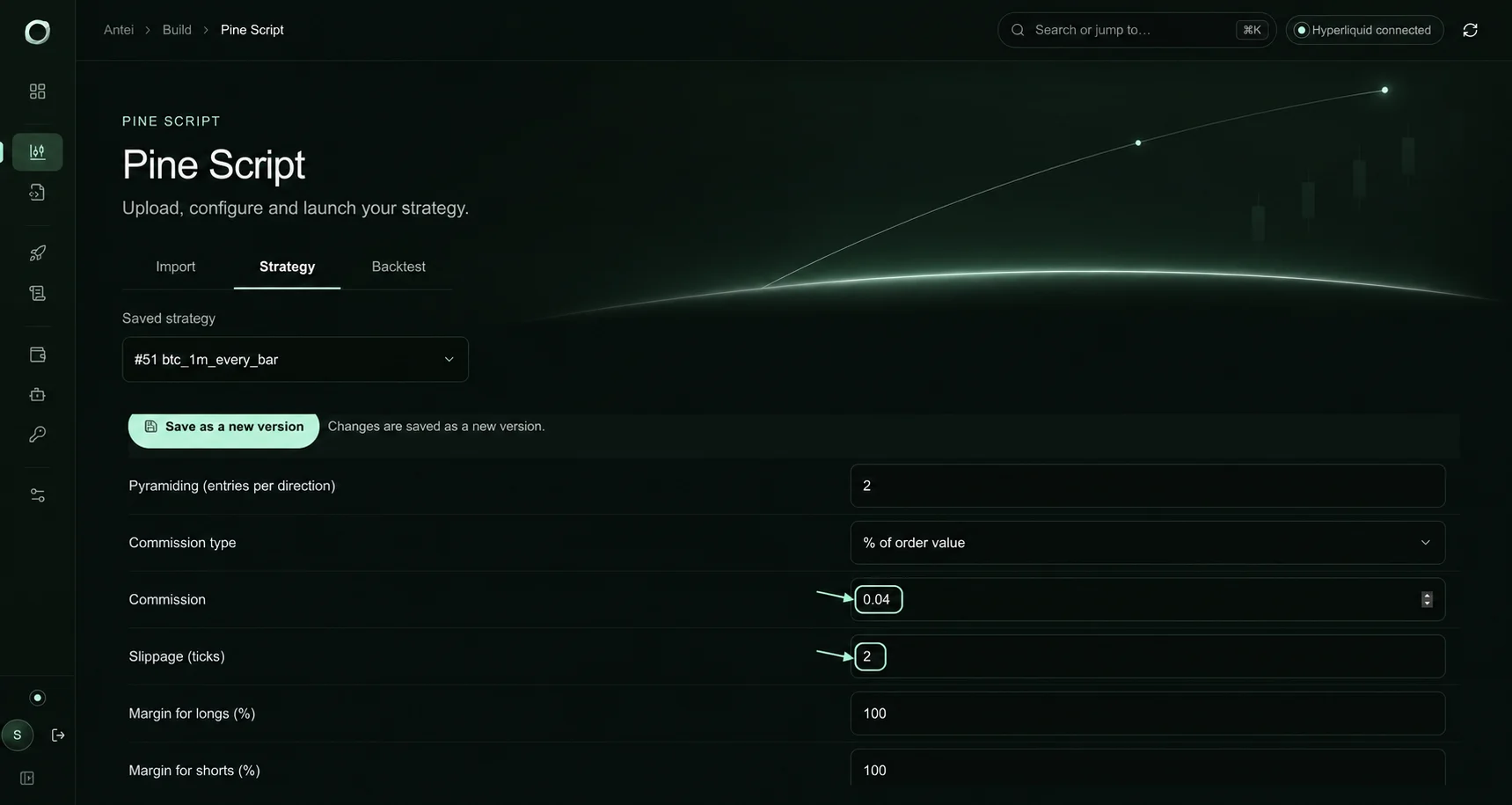
Antei Pine Settings showing Commission type, Commission, and Slippage (ticks).
Step 2: Run a Historical Backtest and Review Venue Costs
After confirming the strategy settings, open the Backtest tab. Choose the exact date range and initial capital you want to test, then run the historical simulation. Review the completed result for trade count, sizing, cost assumptions, and warnings. A tiny sample can make any cost estimate look more reliable than it is, so extend the window when the result contains too few trades.
For Pine strategies, read the venue-reality information carefully: commission and configured slippage are part of the simulated fills, while funding is excluded from the Pine backtest result and presented as an estimate. Do not describe the backtest result as “net of funding” unless the report explicitly says so.
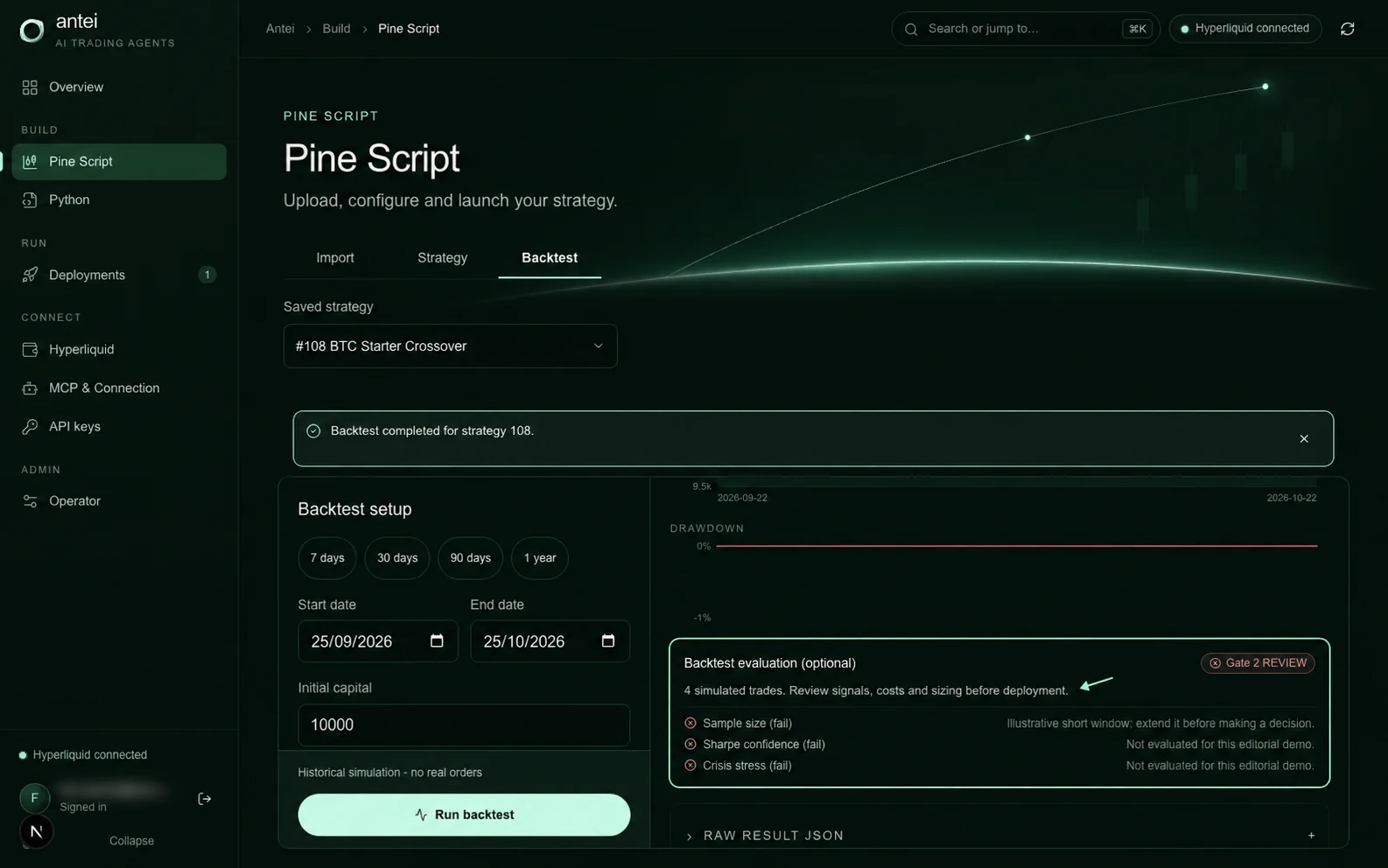
Completed Antei backtest with the evaluation panel reminding the reader to review signals, costs, and sizing.
Step 3: Compare the Backtest with Paper-Trading Costs
Run the strategy in paper mode before considering live deployment. Paper fills and money are simulated, but the deployment Performance tab gives you a second view of the strategy under current market conditions. Compare the backtest with the paper report instead of relying on gross P&L alone.
In the Performance tab, review:
Net P&L for the overall deployment result.
Fees for trading fees recorded by the deployment.
Funding for funding paid or received.
Volume and trade count to judge whether the cost sample is meaningful.
Fills and Runtime logs when you need to investigate an individual order.
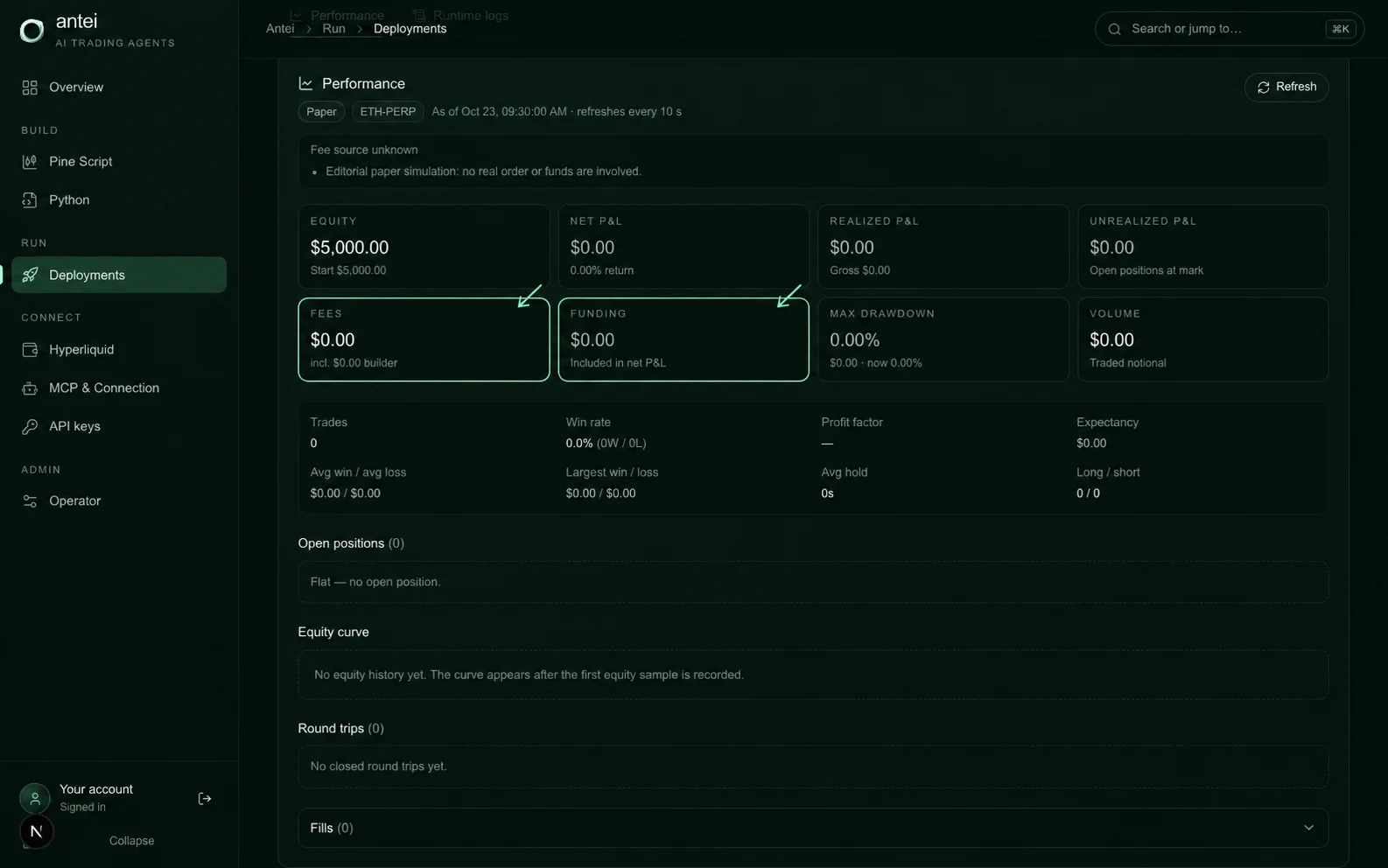
Antei deployment Performance report with separate Fees and Funding metrics.
Worked Example: Calculate Commission Before Adding Other Costs
Assume an illustrative order value of 10,000 USD and commission of 0.045% per fill. One fill would have an estimated commission of:
10,000 × 0.00045 = 4.50 USD
An entry and a full exit would therefore total approximately 9.00 USD in commission before considering partial fills, funding, or slippage. Slippage cannot be converted into a reliable dollar amount without the market’s tick size, the filled quantity, and the actual order path. Funding also depends on position direction, position size, funding rate, and holding time.
This example explains the calculation only; it is not a statement of the fee charged to your account. Verify the rate that applies to you before using it in a strategy version.
A Practical Pre-Deployment Checklist
Confirm the Hyperliquid market and chart timeframe.
Check the commission type and enter the percentage or cash amount per fill.
Set conservative slippage ticks for market and stop-order assumptions.
Run a backtest with enough history and enough simulated trades.
Read the venue-reality funding estimate instead of assuming funding is included in the Pine result.
Start a paper deployment and compare Net P&L, Fees, Funding, Volume, and Fills.
Reduce size or revise the strategy if costs consume too much of its expected edge.
Frequently Asked Questions
Where do I change commission and slippage in Antei AI?
Open the Pine Script strategy, select Strategy → Settings, and expand Strategy properties · sizing, costs and fills. Update Commission type, Commission, and Slippage (ticks), then save the settings as a new version.
Does an Antei Pine backtest include funding in its final result?
No. Pine backtests exclude funding from the backtest result and provide funding information in the venue-reality estimate. After starting a paper or live deployment, use the Performance report’s Funding metric to see the funding recorded for that deployment.
Why can paper results differ from a backtest?
A backtest uses historical bars and configured fill assumptions. Paper trading uses simulated money under current market conditions. Differences in price paths, timing, liquidity, configured slippage, fees, and funding can all change the result. Neither mode guarantees how a live strategy will perform.
Should I use the same slippage ticks for every Hyperliquid market?
No. Markets have different price steps and liquidity. Test the exact market and order size you intend to use, and treat the configured slippage as a conservative modeling assumption rather than a guaranteed fill.
Review Your Strategy Costs in Antei AI
Configure realistic cost assumptions, run a historical backtest, and compare it with a paper deployment before considering live orders. Create an Antei AI account and start with paper trading.
Risk Note
This article is for educational purposes only and does not constitute investment advice. Perpetual futures and leverage involve significant risk. Backtests and paper-trading results are simulations and do not guarantee future performance. Fees, funding rates, market liquidity, and slippage can change.